PLO Upgrades: Custom HU Solving, Postflop ICM, Nodelocking & More
Overview
Two months ago, we launched PLO and said we were just getting started. We meant it.
Heads-up PLO is now live and fully customizable from preflop to river. You can nodelock your opponents’ mistakes, build entire player profiles, and then train against them. You can solve real postflop ICM spots for regular and bounty tournaments. We’ve also expanded the preflop library and upgraded Study Mode, the Trainer, and the solving engine itself.
These upgrades have rolled out over the past two months. Taken together, they represent a massive expansion of PLO at GTO Wizard, including tools that don’t exist in any other PLO solver. Here’s everything that’s changed since launch.
Major PLO Updates Since Launch
- Heads-Up Solving: Fully custom HU strategies from preflop to river.
- Nodelocking: Model your opponents’ mistakes, then punish them.
- Postflop ICM: Tournament solutions with configurable prizes, stacks, and bounty structures.
- Study Upgrades: Preflop matrix, breakdown tab, improved filtering and subcategories.
- Trainer Upgrades: Multi-tabling, drills, info panel, performance stats.
- Engine Upgrades: Faster, more accurate solutions across the board.
- New Solutions: Expansions to cash and MTT preflop library
Preflop Solutions
The PLO preflop library has grown across every major format since launch. We've listened to your feedback on Discord and added the most requested sites, rake structures, and formats.
Below is a complete list of what's currently available. The library grows constantly, so check the app for the latest solutions.
{{toggle:Cash Solutions}}
For cash game specialists, we’ve added preflop solutions for heads up games, CoinPoker, GG Network, ClubWPT Gold, and a wide range of stack depths and rake structures.
- Heads-Up: 10bb to 200bb, (PLO50, PLO500, & cEV rake structures). Solved both with and without limps.
- 6-Max Classic: 20bb to 200bb, (PLO500 & cEV rake structures).
- [CoinPoker] 6-Max Ante: 20bb to 200bb, (PLO100, PLO1k, & cEV rake structures).
- [GG Network] 7-Max: 20bb to 200bb, (PLO500 GG rake structure).
- [ClubWPT Gold] 8-Max Straddle + Ante: 20 to 200 straddles, (PLO1k rake structure).{{/toggle}}
{{toggle:MTT Solutions}}
For tournament specialists, we've added shortstack support down to 5bb effective, and ante coverage now includes a smaller 0.7bb total ante (0.12bb per player).
One setting worth understanding here is whether the ante counts toward preflop raise sizing. Antes are part of the pot either way; the only question is whether a "pot-sized" raise includes them. We solve it both ways so you can match your site.
Ante excluded from preflop raise size:
- 6-Max MTT: 5bb to 100bb, 0.7bb total ante, (cEV)
- 6-Max MTT: 10bb to 100bb, 1bb total ante, (cEV)
Antes included in preflop raise size:
- 6-max MTT; 10bb to 100bb; 1bb ante, (cEV).{{/toggle}}
Pre-Solved vs. Custom Solving: How It Works
As a quick reminder, all multiway PLO preflop solutions are (currently) pre-solved, meaning they are fixed, non-configurable strategies.
Elite users can customize two-player spots, allowing them to define the ranges, bet sizes, stack depths, and other parameters. That customization now extends preflop!
Heads-Up Preflop Solving
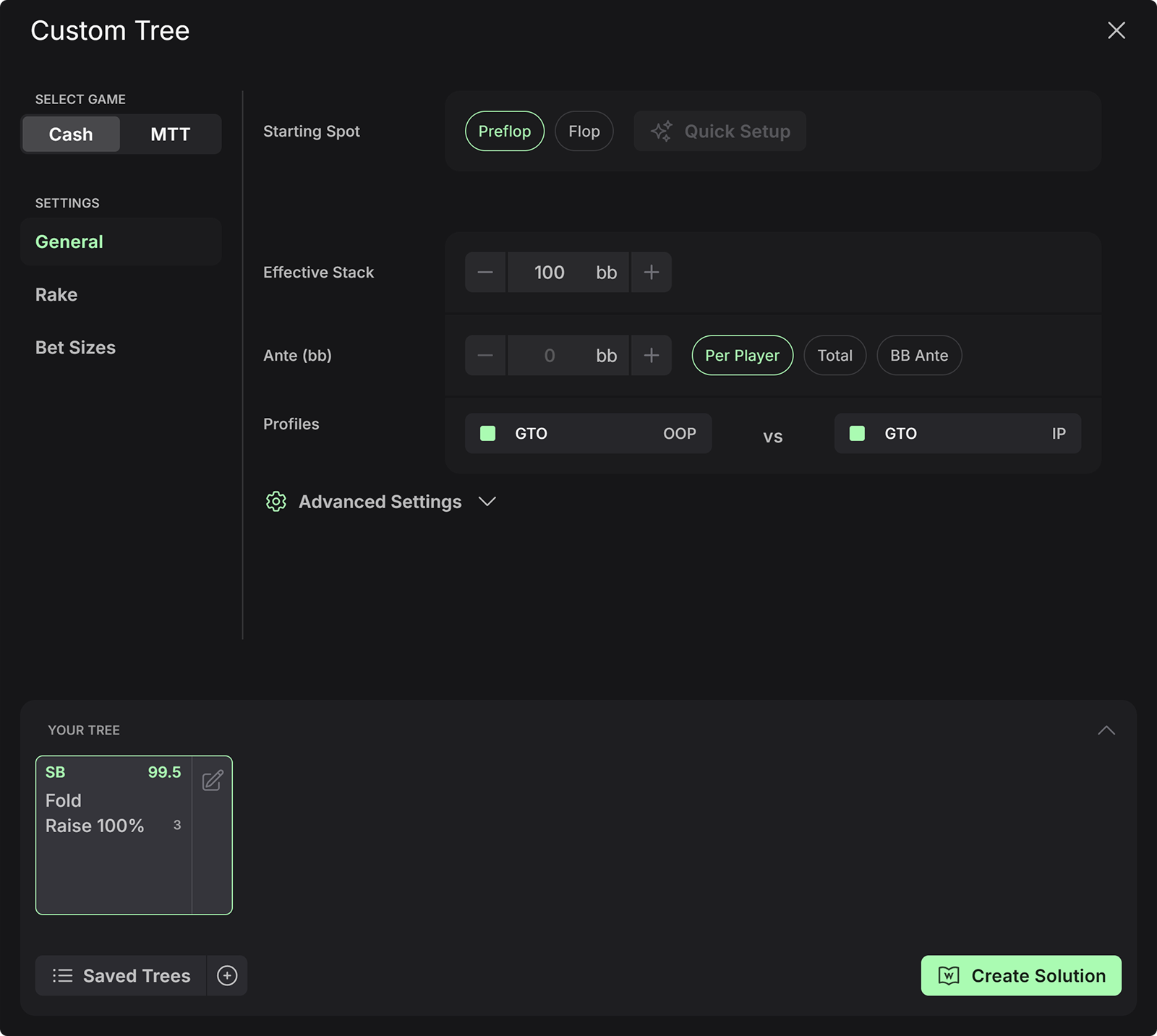
Heads-up preflop were the most requested solutions by a large margin. But we didn’t just upload a static library, we built a fully customizable HU preflop solver. That means you can set the rake structure, stack depth, antes, bet sizes, and even nodelock strategies or model exploitable profiles. Practice mode also supports custom heads up solutions, so you can train preflop to river.
To solve preflop, create a custom tree and select Starting Spot: Preflop.
{{width: 75%}}
{{/width}}
These spots are also easier to picture now with our latest data visualizations, including a preflop matrix view, compare view, and breakdown tab, and the EQ/EV distribution chart now extends to HU preflop.
Heads-up is the most skill-intensive format in poker. Most hands are obligated to play, so edges are magnified because there's nowhere to hide. Every mistake, every imbalance, every exploitable tendency becomes more obvious heads-up. That’s why our next feature is especially useful: nodelocking.
Nodelocking & Profiles
Before PLO in GTO Wizard, PLO solvers mostly taught you how to play a balanced strategy. Now, you can learn how to exploit your opponent’s imbalanced strategy by capitalizing on their mistakes.
Nodelocking comes in two flavors: Frequency Locking, and Player Profiles. These exploitative tools are unique to GTO Wizard.
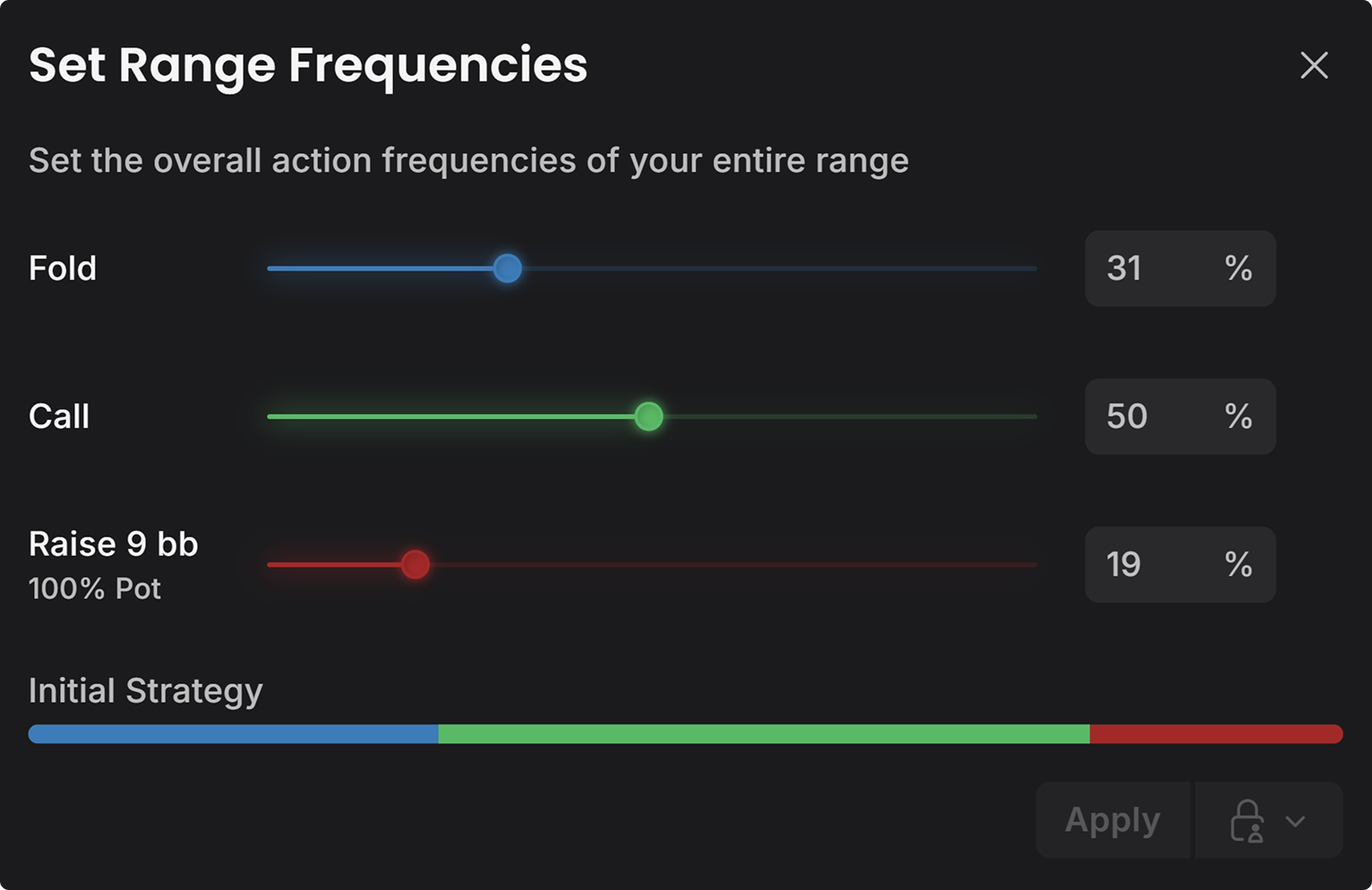
Frequency locking sets strategies at one node. You decide exactly how often they take each action at that decision point. For example, does your opponent not 3-bet enough HU? Decrease their raising frequency in the nodelocking menu, and watch how the SB punishes them by opening much wider.
{{width: 75%}}
{{/width}}
When you click apply, the engine finds the least exploitable way to achieve the desired frequencies, while the opposing player attacks their weaknesses with precision. You can learn more about the underlying technology here.
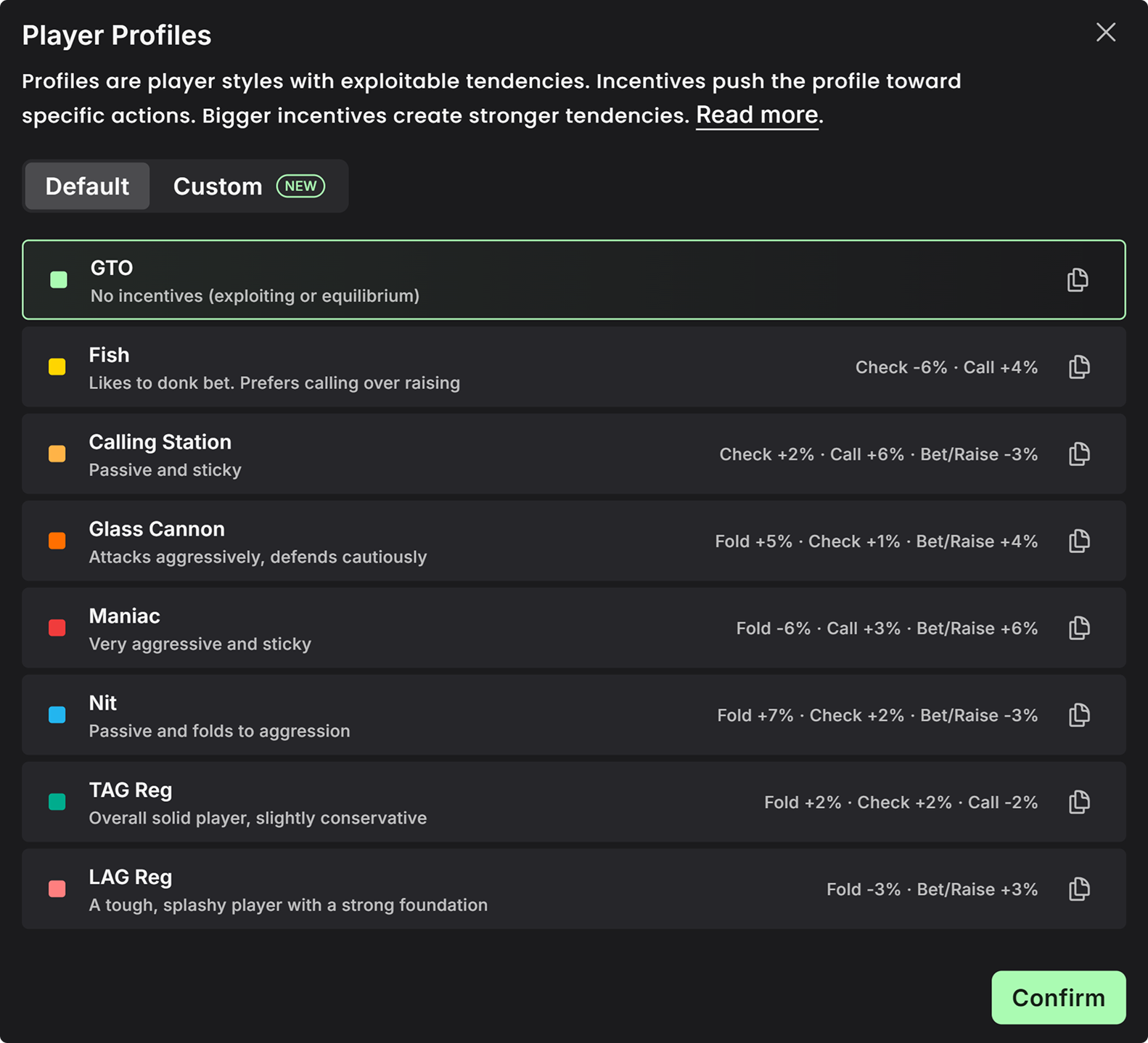
Player Profiles take this a step further, applying persistent exploitable tendencies to a player at every decision. Since these are applied to the entire tree, they are set in the tree builder menu of custom solutions.
{{width: 75%}}
{{/width}}
For example, a very aggressive opponent that folds when you fight back might best be modeled with a Glass Cannon profile, which has increased incentives to fold and bet or raise. This means they break when you apply pressure, but are quick to seize control when they sense weakness. You can even build your own profiles by setting incentives manually.
Profiles are fully trainable as custom solutions. A nodelock only defines how a player behaves in one spot; a profile applies everywhere, so you can play full hands against a maniac or a nit in the Trainer and drill the adjustments until they're automatic.
Postflop ICM Solving
The essence of tournament poker is that sometimes survival trumps chip accumulation. The value of chips in MTTs is predicted by the Independent Chip Model (ICM), which is now a built-in option when custom solving postflop PLO spots. ICM adjustments are crucial for professional tournament play, especially in high-pressure spots near the bubble and final table.
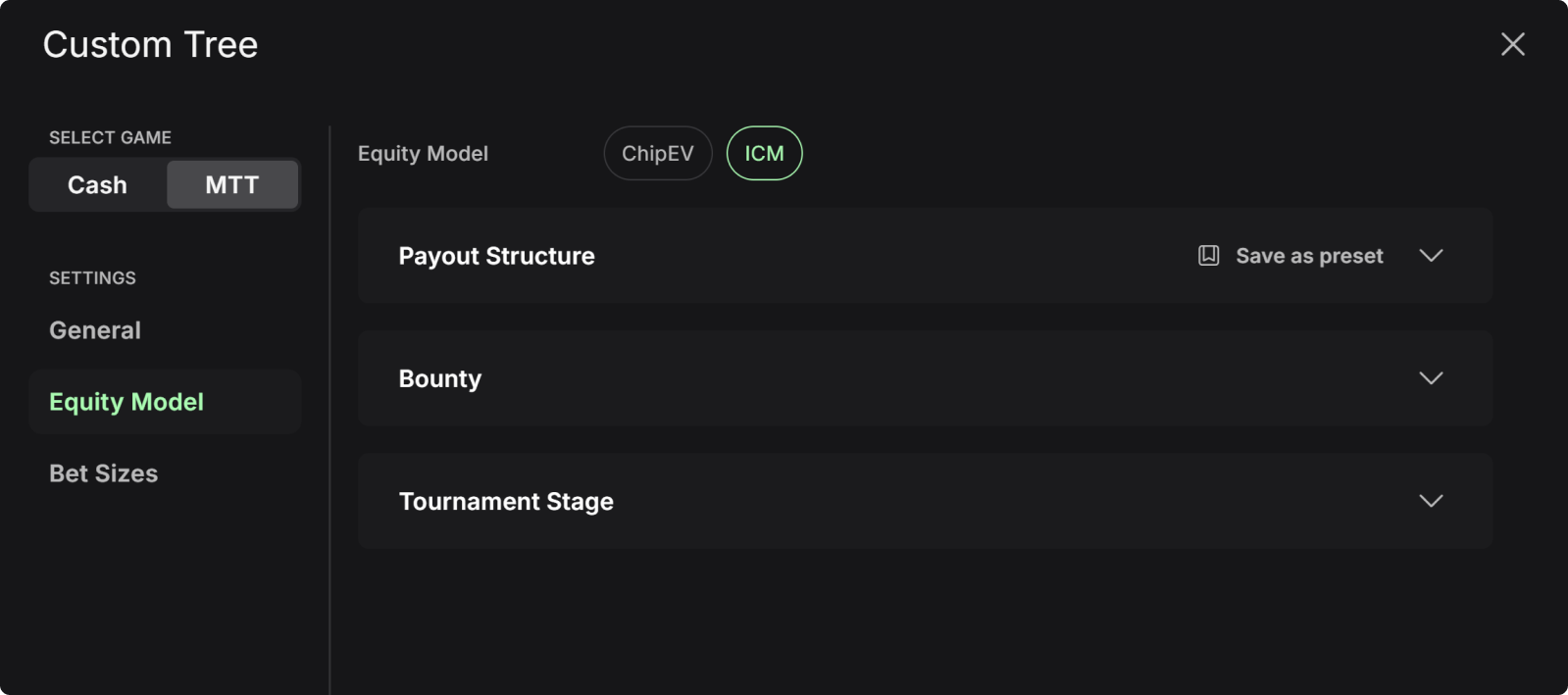
To activate ICM in PLO, customize an MTT Tree, then set the Equity Model to ICM.
{{width: 75%}}
{{/width}}
Payout Structure: Selects the format and prizes. We support all major MTT formats including regular and bounty tournaments (KO, PKO, TKO). Then, scroll down to configure the prize structure, or press the Browse button to choose from a list of common tournament structures. You can also save your structure for later use.
Bounty: Sets the amount of bounty on each player’s head, as well as the average field bounty. This menu appears after selecting a knockout format in the payout structure.
Tournament Stage: Sets how many players remain and stack sizes. You can choose between manual or automatic stack distributions. Note that the stacks of the two active players are set in the General tab, not the Equity Model tab.
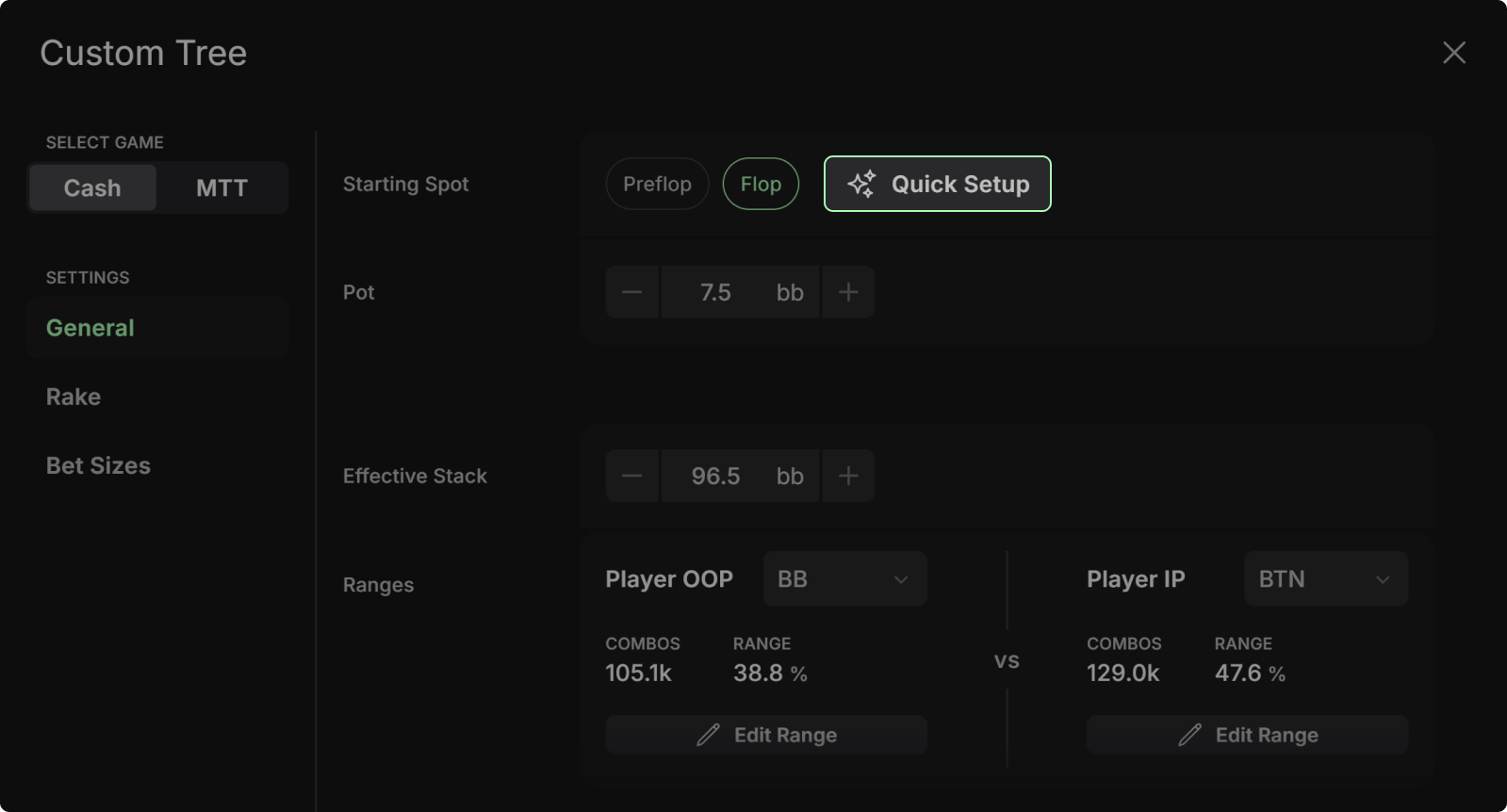
Pro Tip – Use the Quick Setup button to quickly select cEV preflop ranges. ICM preflop solutions are in development.
Study Upgrades
We’ve added several great features to study mode to help you visualize and better learn the strategy.
PLO Preflop Matrix
The Preflop Matrix is the fastest way to see a whole PLO strategy at once. Rather than scrolling through an endless list of 270k combos, you read the strategy off a 13x13 grid, the same way you visualize strategies in Hold'em.
Each cell is named by its two highest ranks. A hand like T9 means your hand contains a Ten, Nine, and any two side cards lower than or equal to a Nine.
"Suited" is ambiguous in PLO, so you control what the diagonal means: use the settings to define what sits on each side, and the filters to isolate specific suit patterns. A proportional view scales each square by how many combos it holds, giving you a sense of each square’s weight.
In this case, I’ve chosen to display double-suited hands on the right hand side. You can also shift the single and triple-suited hands to the right using this dropdown.
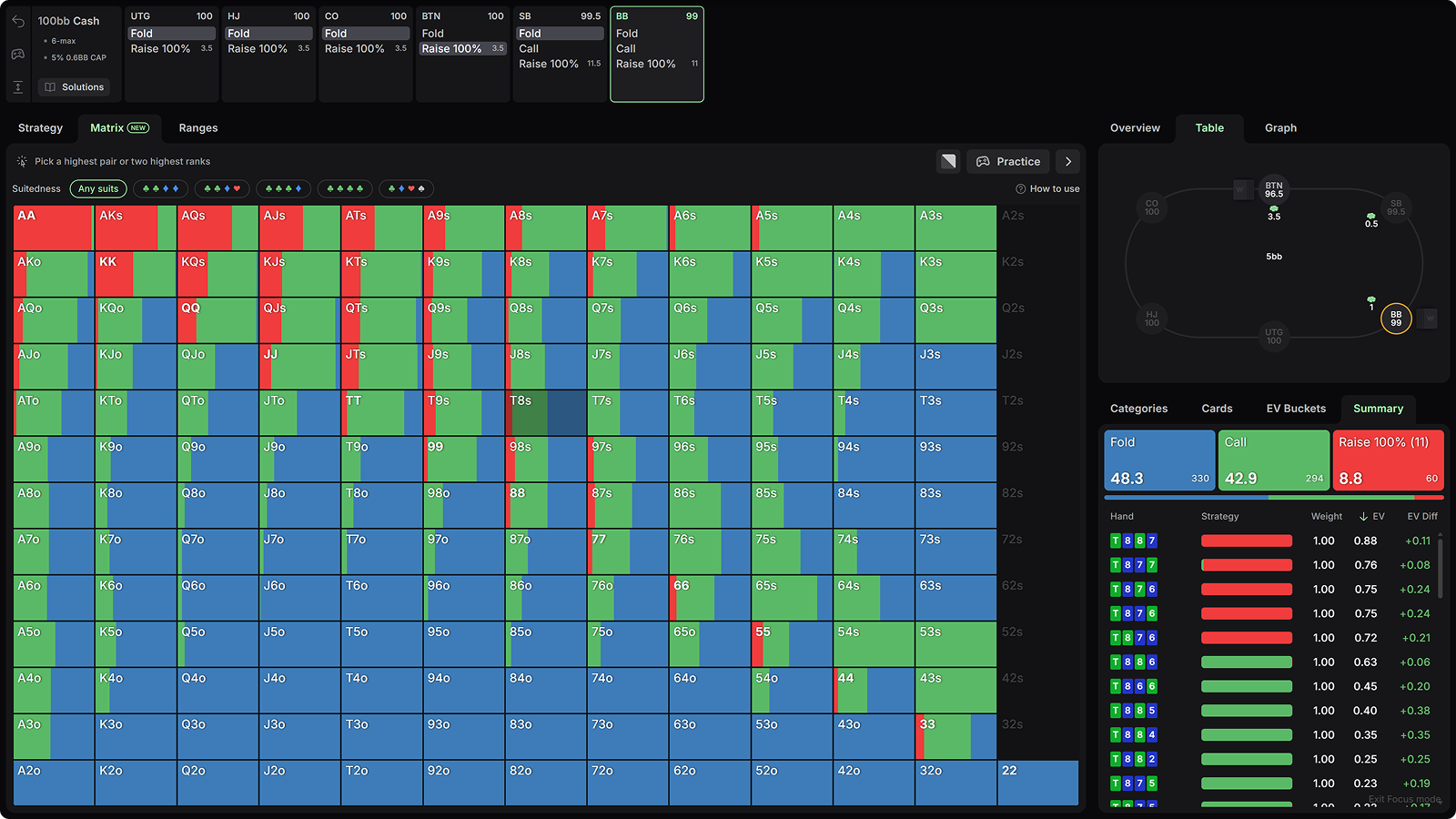
Hovering over any hand reveals its grouped strategy in the Summary tab. Above, I’m hovering over T9s (double-suited), and we can see it 3-bets 16% of the time, and folds 10% of the time.
Clicking T9 filters for hands with Ten and Nine as the highest two cards, and creates a new matrix view with the lower side cards. The best T9XX 3-bets are connected, paired hands like T998, T987, or T986 double-suited. Meanwhile, a hand like T999 is a clear fold.
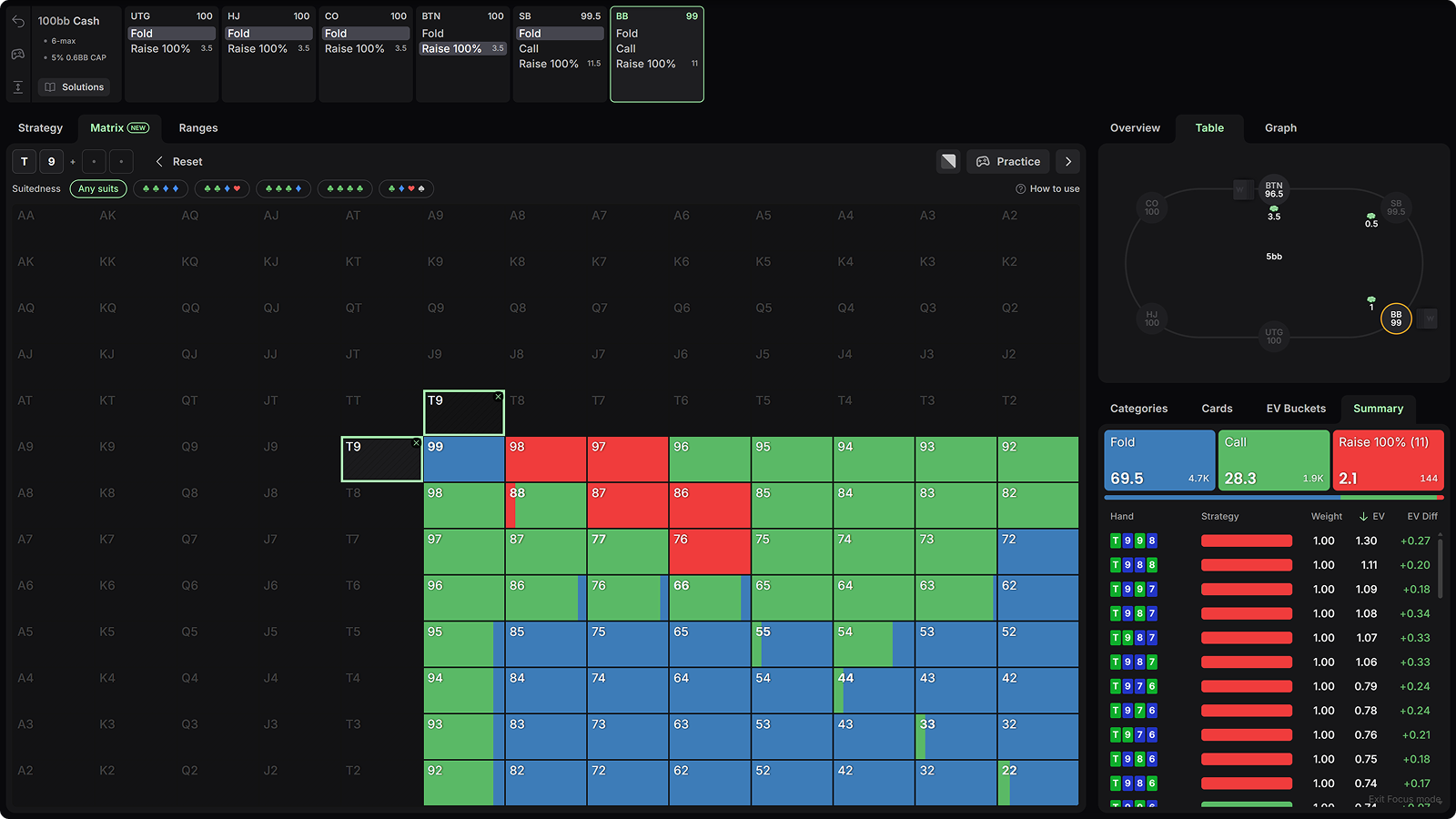
This visualization condenses hundreds of thousands of combinations into an interactive picture that speeds up preflop learning dramatically. But good players don't learn one position at a time, they group situations together, and focus on how position shifts the thresholds. That's why we built the Compare view.
Compare
One matrix shows you one spot. Compare shows you every player's preflop strategy simultaneously.
Here, UTG has opened, and you can see how each position responds when the action folds to them facing that raise. Each player’s overall strategy sits above their range.
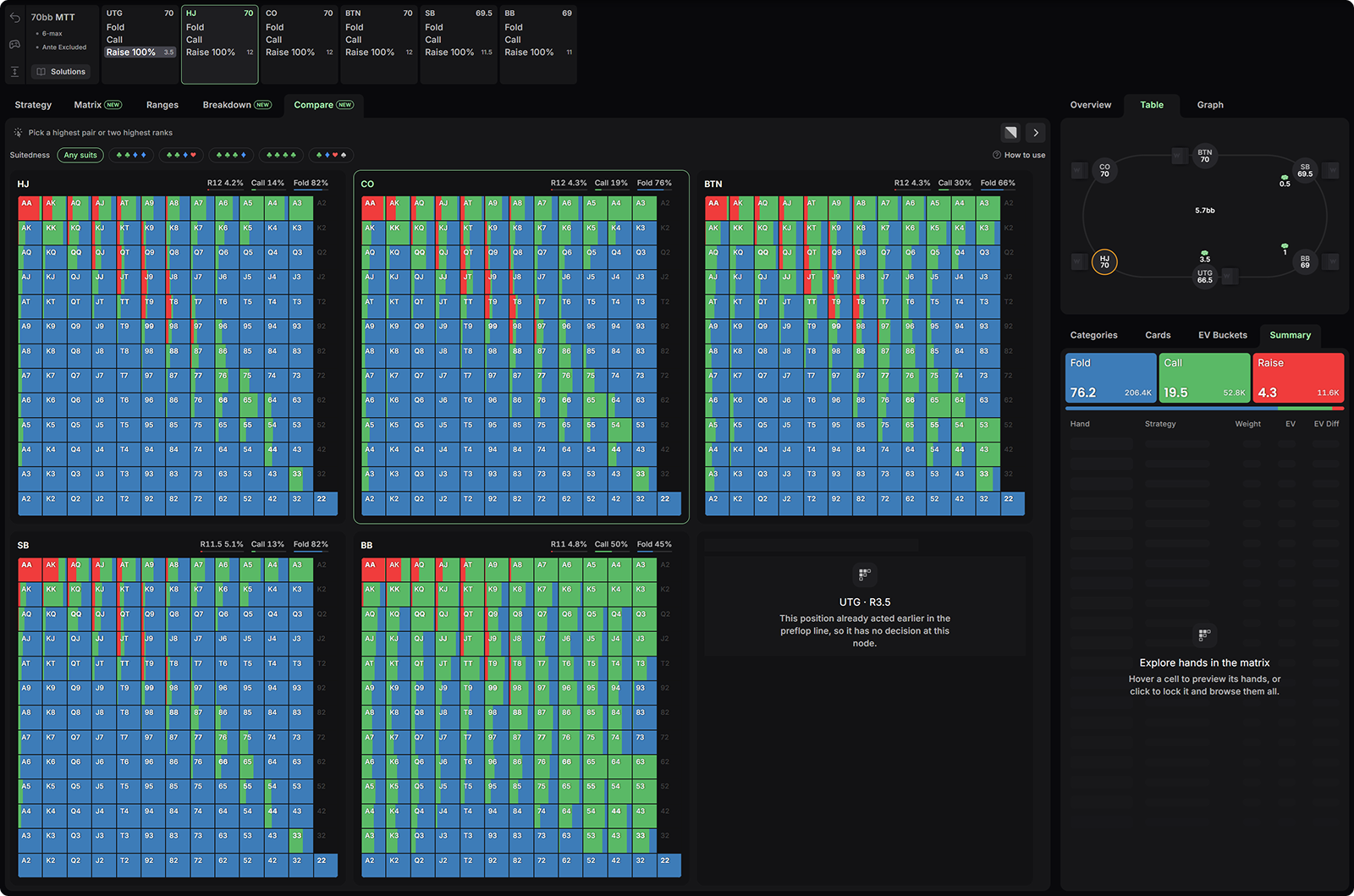
Select any hand to filter for those ranks across every view. Here I've filtered for JJ, which mostly splits between calling and folding. The Summary panel shows CO's JJ strategy and breaks it down by combo.
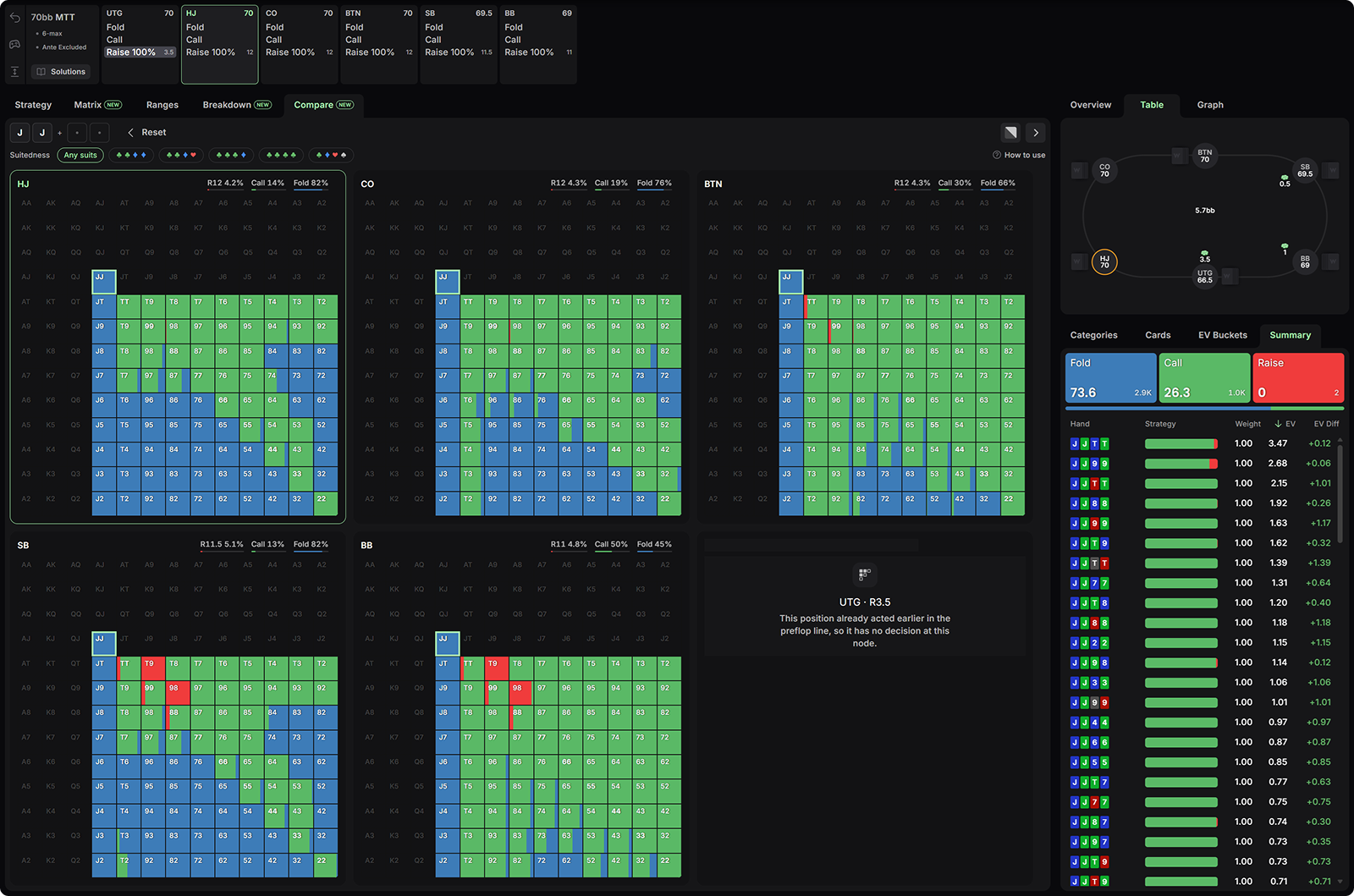
This view aggregates so many hands into one screenshot. It’s easy to pick up rules like “JJ prefers to call vs EP, unless you’re OOP and have a double suited hand with connected side cards like T9, 98, or TT-88”. A heuristic like that condenses hundreds of hours of study into one easy takeaway that you can immediately apply to your game. That’s the power of the preflop Compare tab.
However, we didn’t just stop at preflop visualizations. Postflop deserves consideration too.
Breakdown
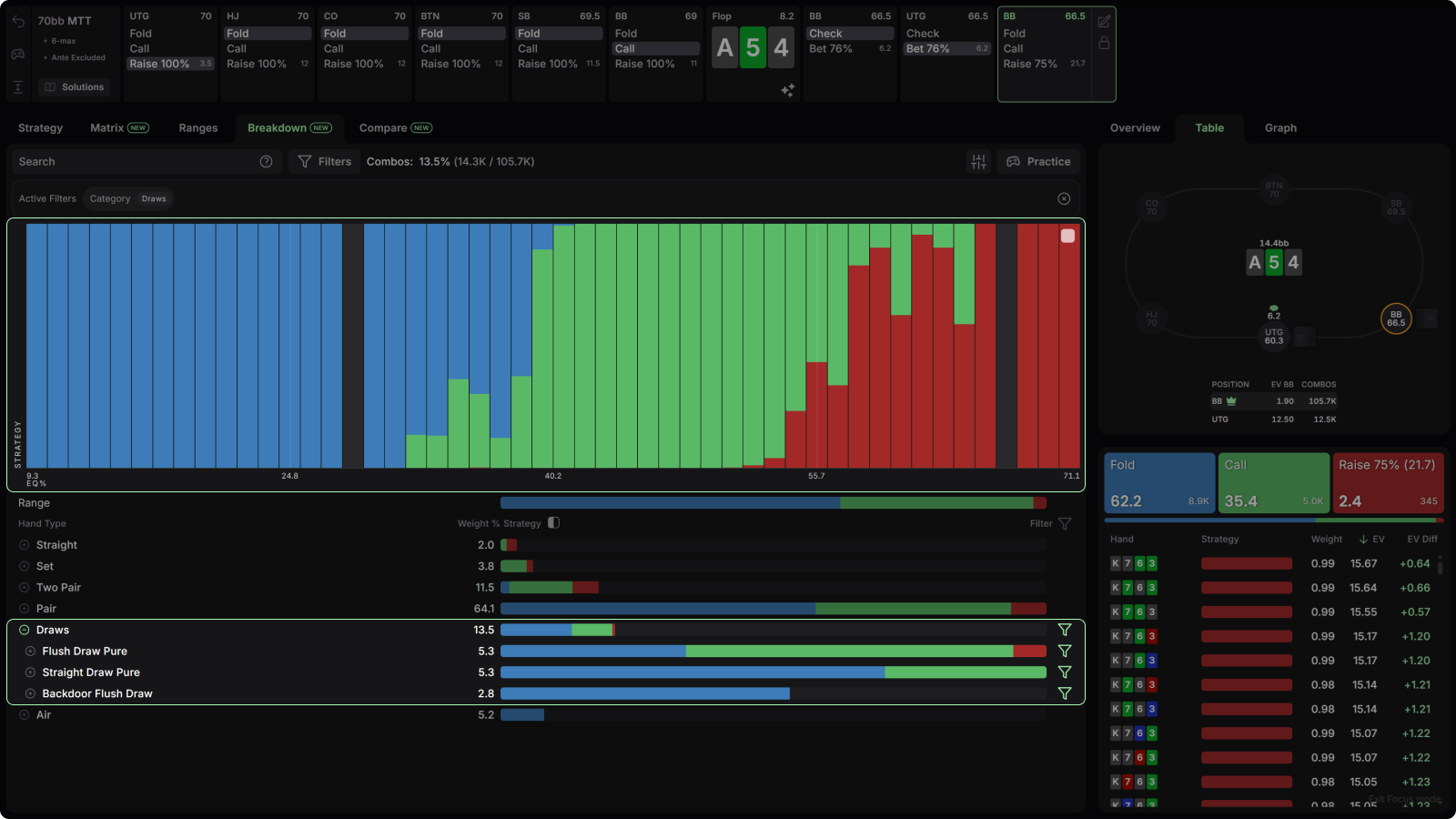
The Breakdown tab shows your postflop strategy by equity bucket. Each column groups hands by equity and colors them by strategy, so you can see how your play shifts as your hand gets stronger. Normalize the columns or show full-length bars, and filter by hand type or subcategory below.
For example, say we called that UTG raise from the BB. We check, and face a 76% pot c-bet. Even hands with as much as 50% equity start folding here.
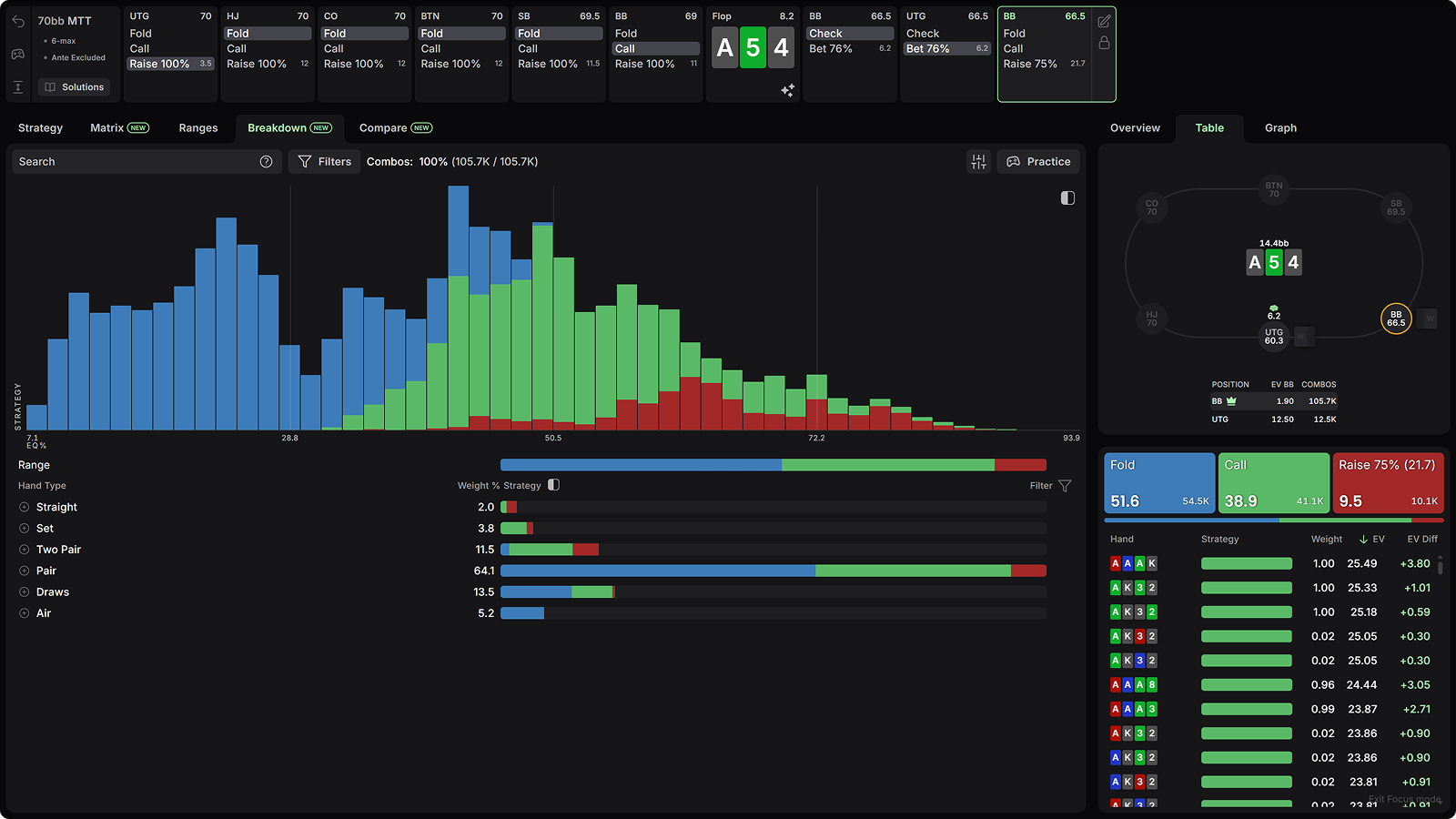
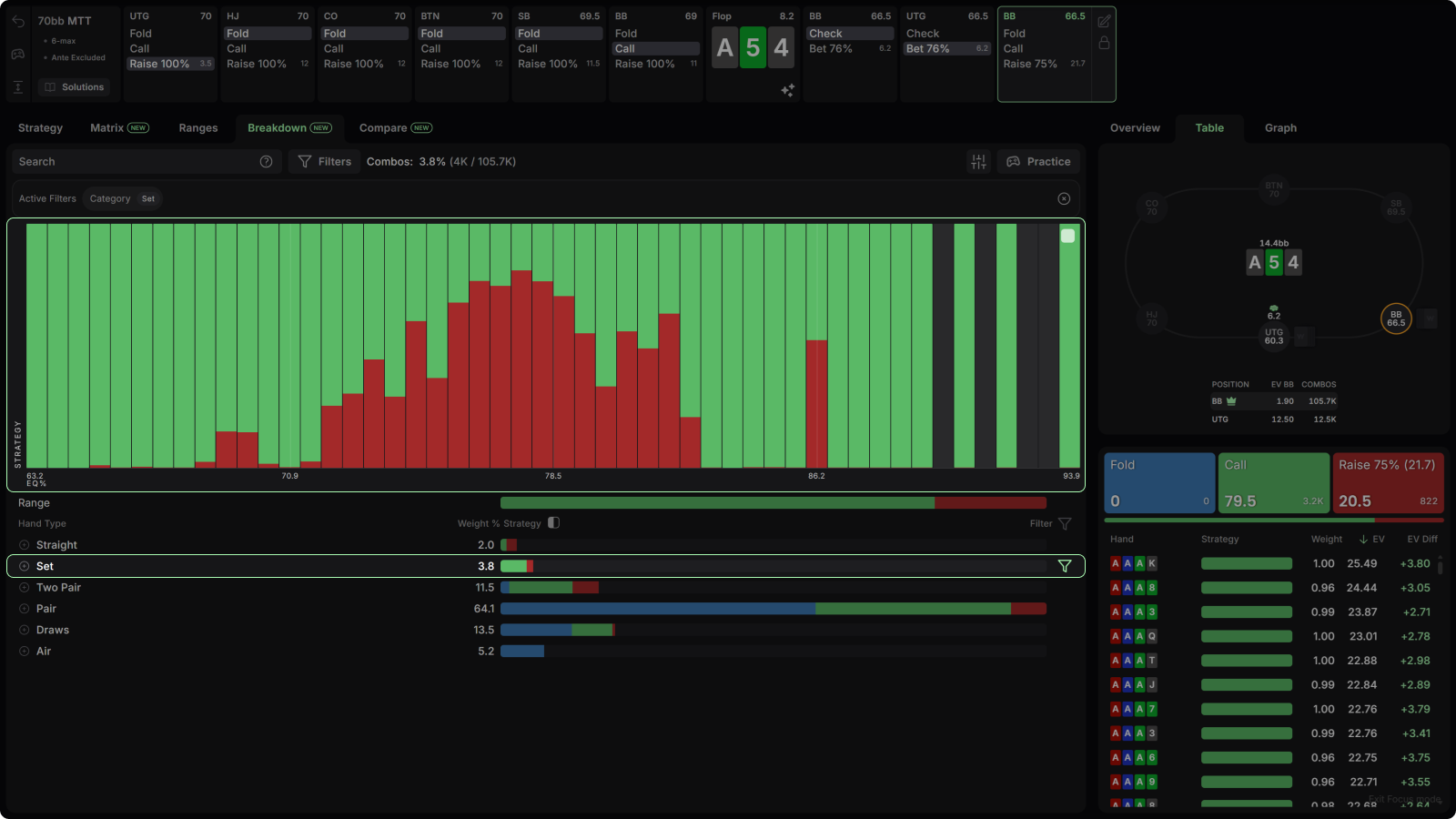
While “strong hands continue” isn’t exactly a breakthrough, the real value shows up when you apply a category filter, because now you can ask how linear your strategy is within a single hand type.
Filter for draws and the response is sharply linear: raise your strongest draws, call your middling ones, fold the weakest.
But applying that same filter to sets rather than draws reveals a more depolarized strategy, with the weakest and strongest sets preferring calls.
Other Study Mode Improvements
We’ve added several small but essential upgrades to study mode over time.
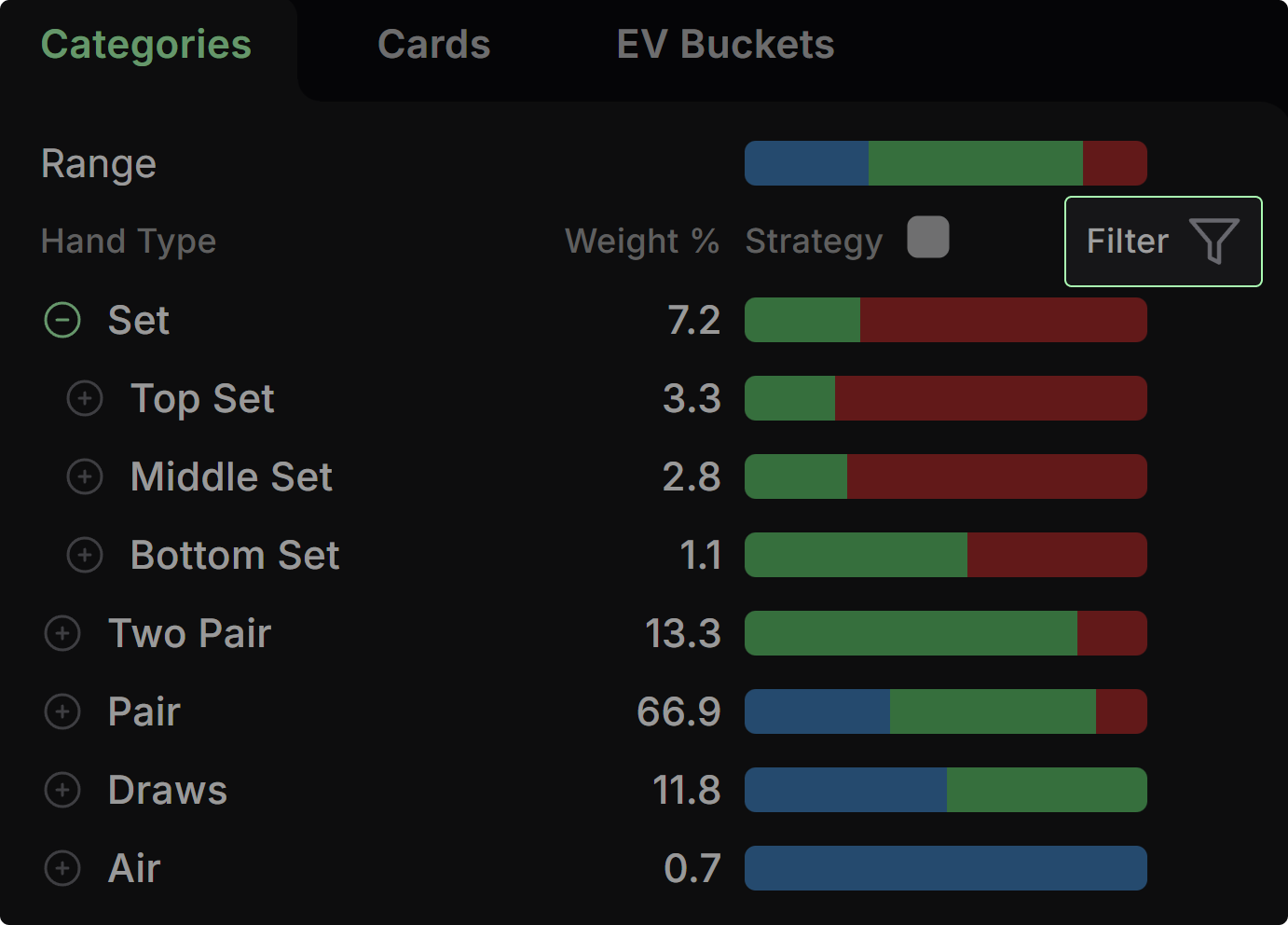
Improved Categories: We’ve improved the logic of hand subcategories, and added a new Include/Exclude mode that flips filters from "show me these hands" to "hide these hands" with one click.
{{width: 75%}}
{{/width}}
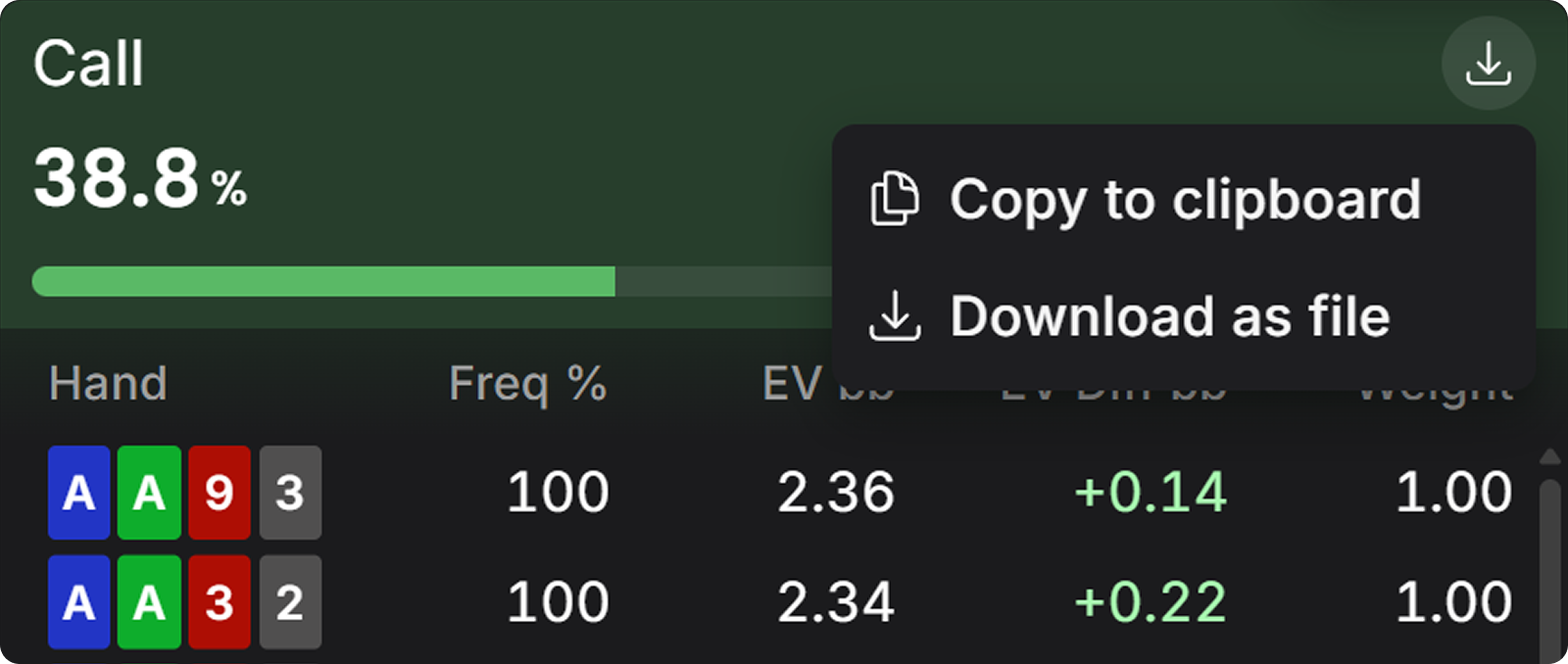
Export Preflop Range: Click this icon in the top right corner of any preflop action to export it in PPT format for later use.
{{width: 67%}}
{{/width}}
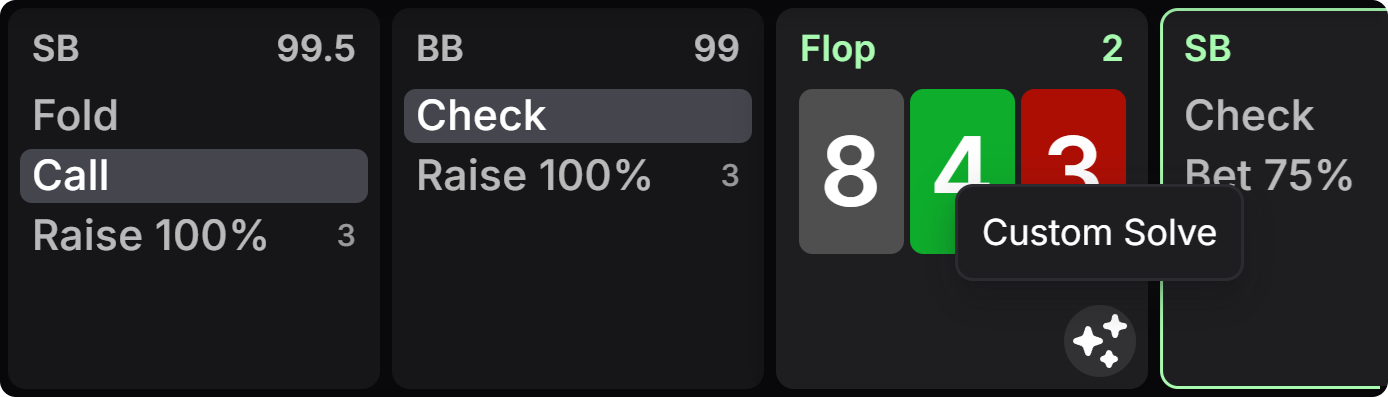
We’ve also improved the workflow with several shortcuts between pre-solved spots and custom solutions, such as this one underneath the flop that imports the preflop ranges into the custom postflop solver:
{{width: 67%}}
{{/width}}
Cleaner range views. Solver output is noisy. Hands taking an action at 0.1% frequency are now hidden by default. You can display these low frequency hands in settings.
Equity distribution graphs, now preflop. Compare both players’ EV and EQ distributions in heads-up preflop spots. These graphs show polarity and range advantage directly, and the legend now includes per-player EV, equity, and combo counts.
Trainer Upgrades
Study builds knowledge. Practice turns it into instinct. The Trainer got a lot better at its job these past two months.
- Drills: Save your favorite training setups
- Info Panel: Strategic context displays while you play
- Multi-tabling: Up to 4 tables at once
- Betting line training: Drill any line without configuring sizes
- Change Move: Fix mistakes mid-hand and keep playing
- Stats: Track performance, find leaks
Drills
(Settings → Drills)
Drills let you save and reuse custom training settings. Build your ideal drill once, save it, and load it whenever that spot needs work. You can find the drill menu in the bottom-left corner.
Info Panel
The Info Panel displays crucial strategic context that updates as you practice:
- Stats: Session performance and EV loss
- Hand Strategy: See how to play your specific hand, and similar hand categories
- Range Strategy: See how your entire range plays in this spot
- Matrix: Displays the Preflop Matrix
- History: Previously played hands
The view is useful for calibrating your instincts. Pay attention to how your entire range plays, and how your hand category wants to play.
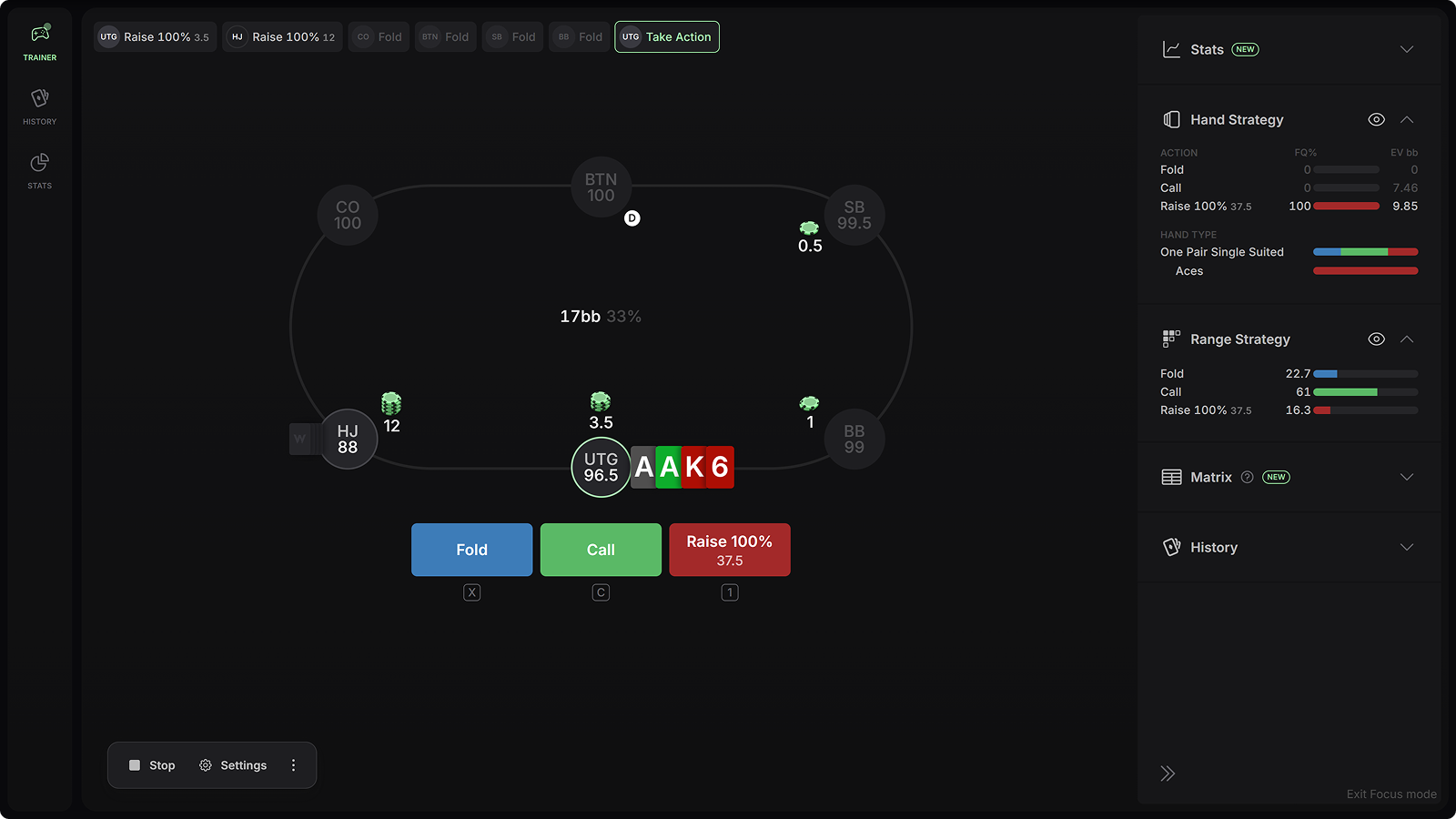
You’ll likely never have this exact hand in this exact spot again. But you’ll very likely have similar hands in similar spots. The info panel helps generalize that knowledge.
Multi-Tabling
(Settings → Gameplay → Tables)
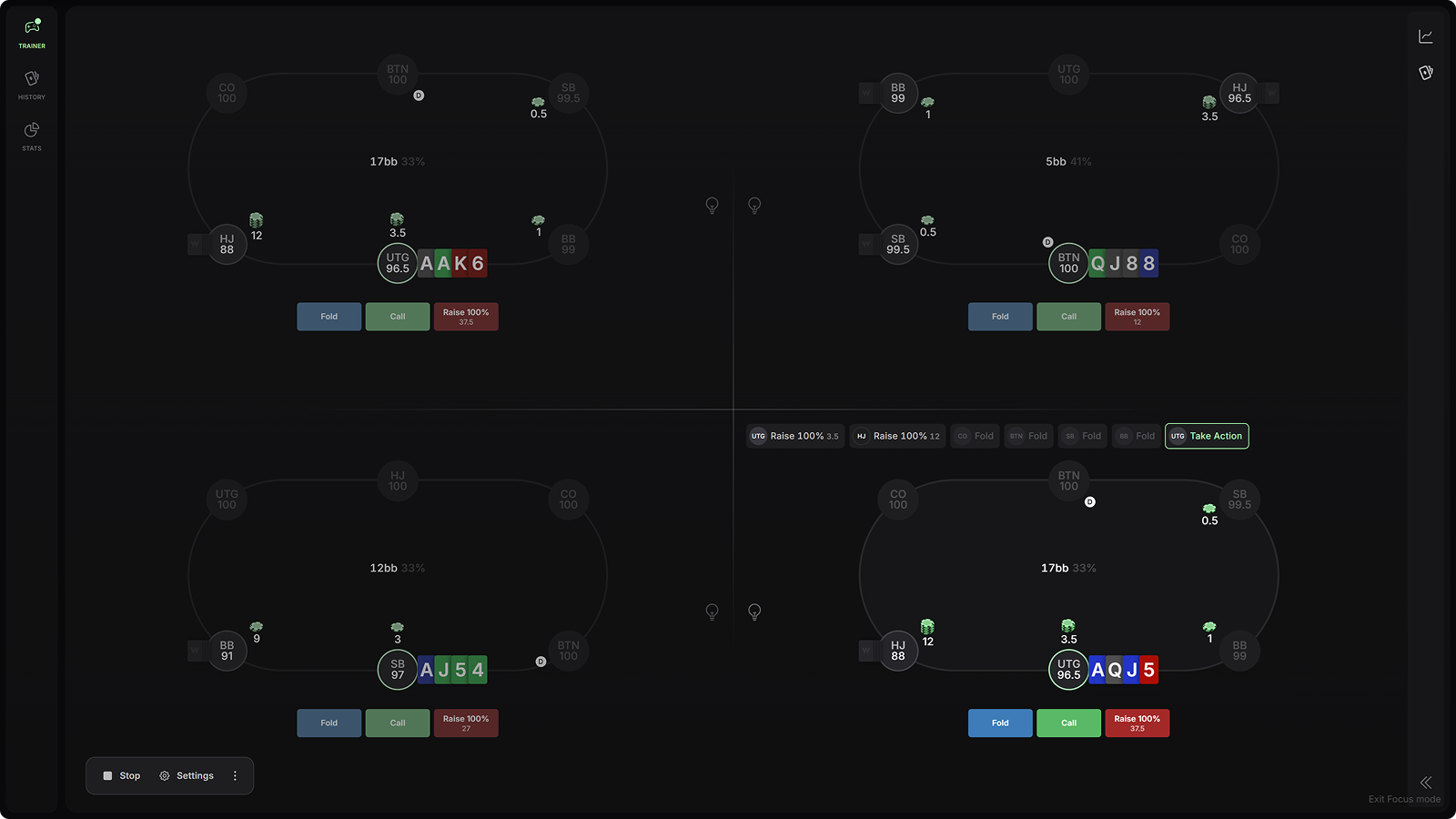
Now you can practice up to 4 tables at the same time. Max volume, max pain, max gain. Each table runs its own hand, and the layout scales to your screen. If you're preparing for real online play, train the way you grind. Select the lightbulb icon to display info on each table.
Betting Lines
(Settings → Solution → Custom)
Train late-street spots like turn probes or river triple barrels. Select a custom betting line without specifying sizes, and hone your strategy on specific parts of the game tree. Many pros advise their students to practice specific turn and river spots that often go neglected.
Change Action
(Settings → Gameplay → Pause Game After)
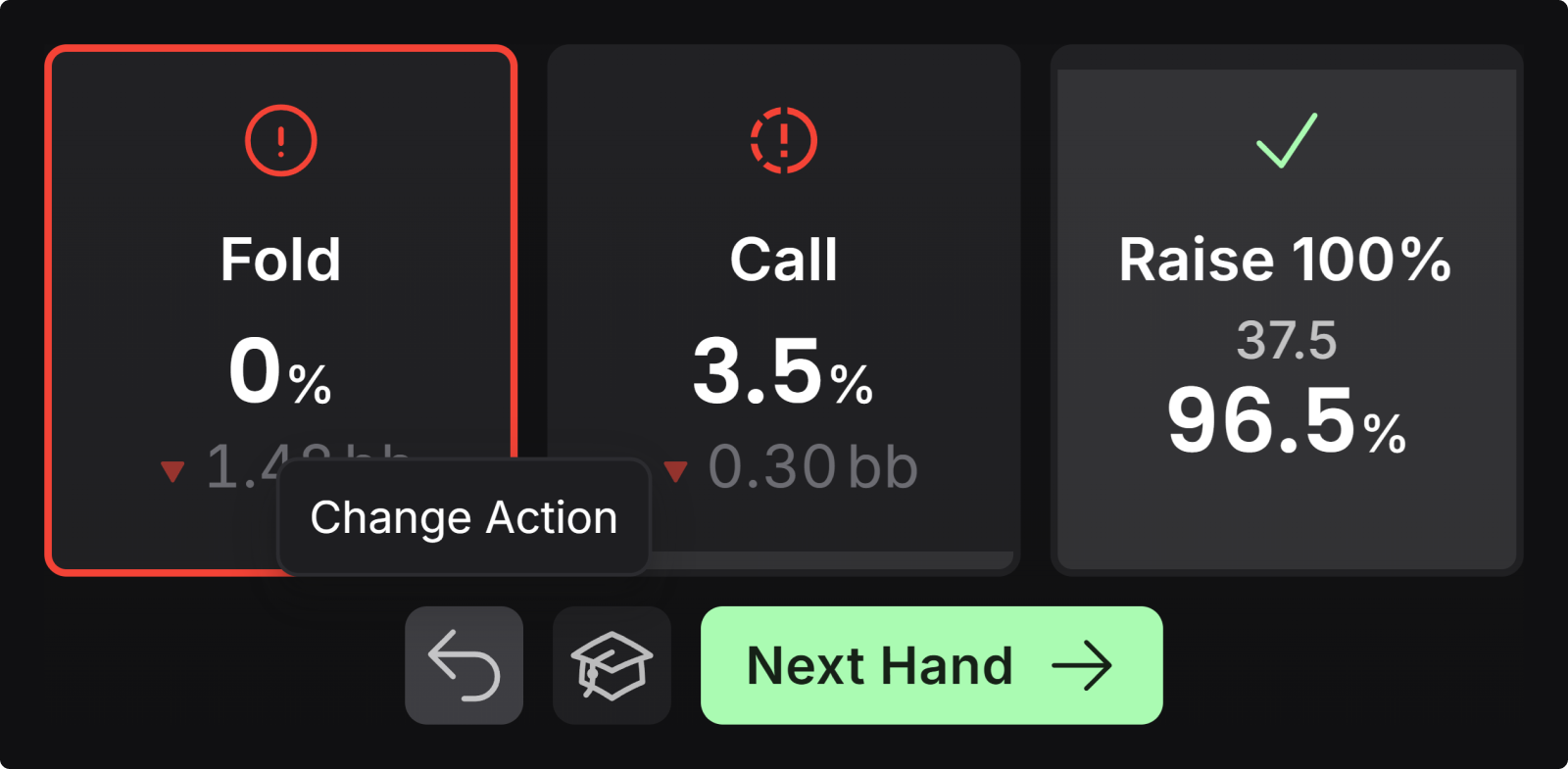
Now you can change your move. Useful for undoing misclicks, or just seeing how it could have played out if you'd taken another line. You can set the trainer to pause after each move, after each mistake, or not at all.
{{width: 67%}}
{{/width}}
Stats
(Practice → Stats)
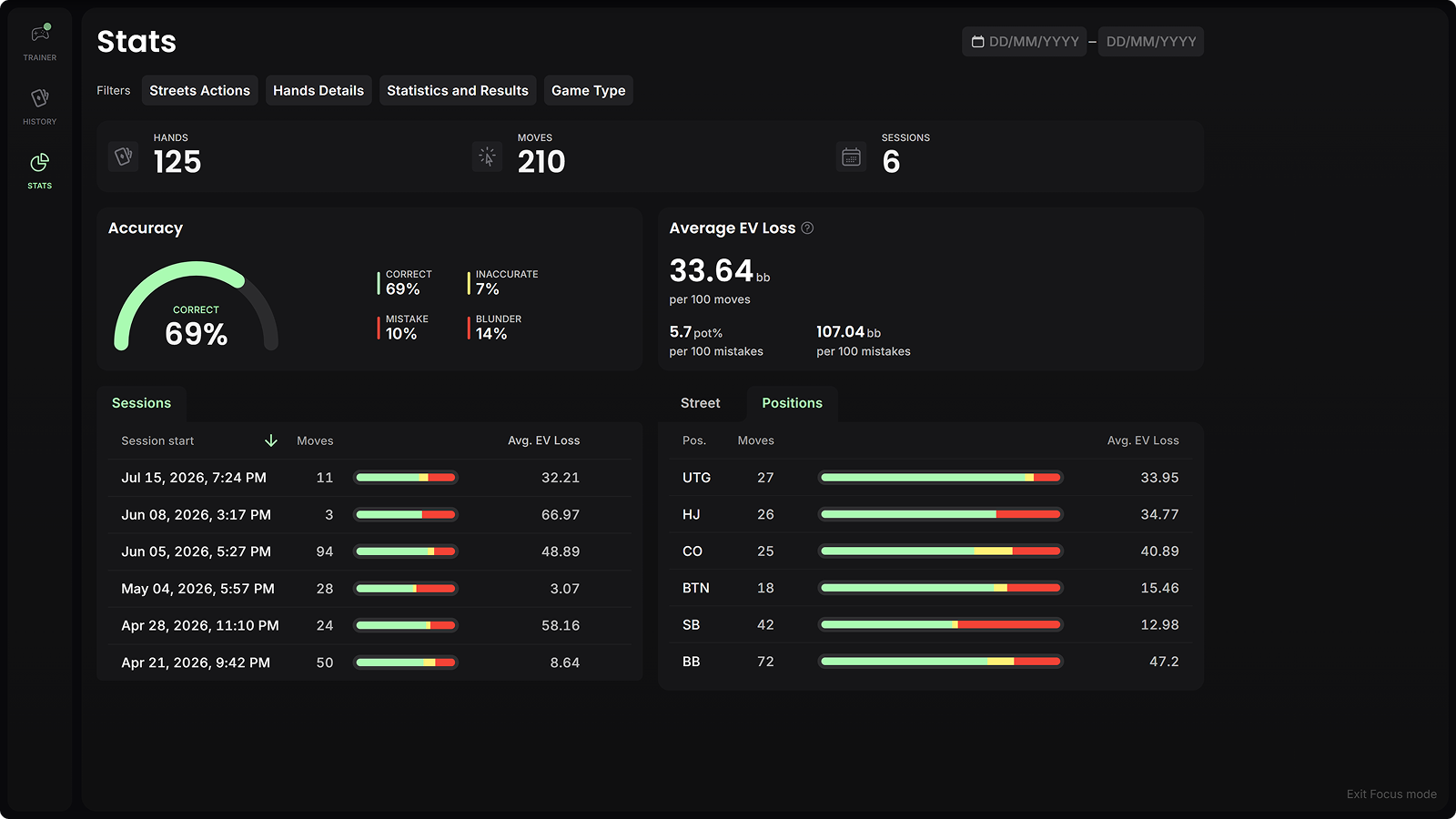
The Trainer now keeps score. Trainer stats show your EV loss in bb/100, session by session, with breakdowns by position and street, plus an overall accuracy score. Use this view to track performance over time and focus your training sessions on parts of your game that need work.
Smaller Trainer improvements
Sessions persist when you switch solutions and show a LIVE indicator, so you can pop into Study Mode and jump right back in. Postflop category filters now match practice spots more consistently, with clear handling when a combination has no match. You can create custom solutions directly from the Trainer setup. EV loss displays in big blinds or as a percentage of pot, the better metric when you're mixing pot sizes. And there are new keyboard shortcuts for actions and next hand, plus a floating settings bar. Lastly, we’ve also improved the practiced history page.
Engine Upgrades
Most of this update describes what you can do. This part is how fast you can do it. We’ve spent significant effort improving GTO Wizard AI, the core engine that powers our PLO solutions.
Every street has gotten faster since launch. PLO river spots now solve about ~2x as fast, to the same 0.1% pot exploitability. At the same time, we increased max allowed tree size to make room for deeper stacked solves.
But it doesn’t stop there. Our work on PLO led to several major technical breakthroughs which carried over to our Hold’em solver. As a result, NLHE spots now solve about 3x to 6x faster without loss of accuracy.
These speed improvements will be key to unlocking some exciting new features over the next couple of months, so stay tuned 🚀.
What's Next?
The pace isn't slowing down. Aggregated reports, mobile support, and an ever-expanding preflop library are all in the works. And PLO5 research is underway, so expect even more cards added to the great game soon.
Thank you for helping us make the best four card trainer in the world. We’re proud of what we’ve built, and thankful to our community for helping us build it.
Most of what's in this update started as a Discord request. Keep them coming in #plo-in-wizard.
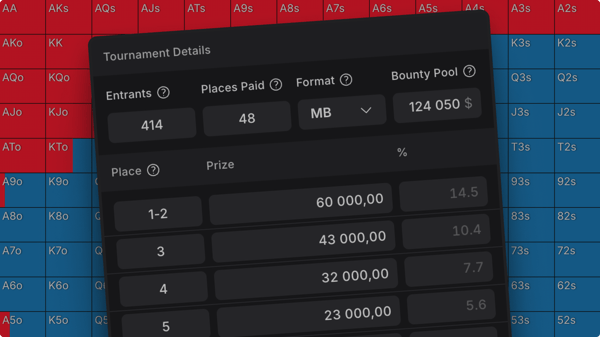
Custom Solutions Upgrade and Easier Preflop ICM Setup
Custom solutions now go 1,000bb deep, GTO Wizard AI can choose your 3-way bet sizes, and you can load any tournament spot directly from a hand history.
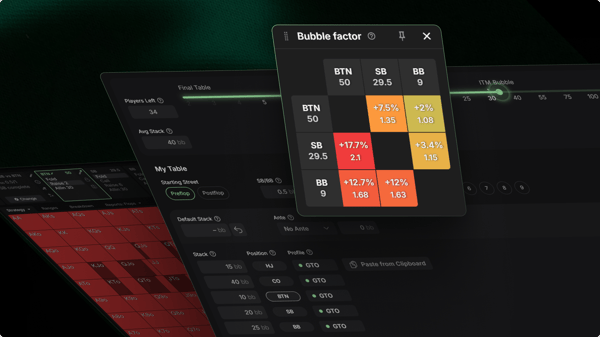
Now Live: Preflop ICM Solving
Solve any tournament spot in seconds: your own stacks, antes, payouts, and bounties, up to 9 players and 250bb deep, in fields as large as 4,096 runners. Nodelock opponents, compare ICM against chip EV, and carry the ranges into 3-way postflop.
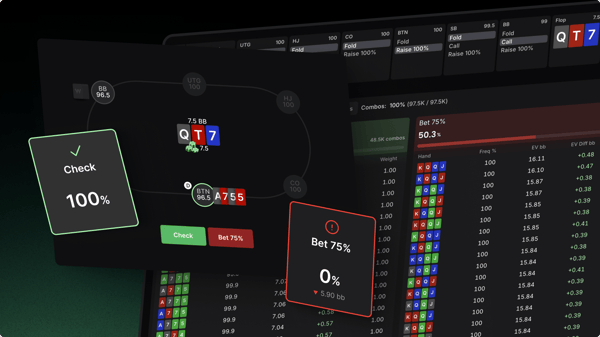
PLO Just Changed Forever
Five years ago, we built GTO Wizard and changed how the world studies Texas Hold'em. Today, it is PLO's turn.