Where to Get Your Hand Histories

Overview
Our hand history Analyzer is a powerful tool, but to use it, you first need to locate your hand history. This guide will walk you through how to export your hand histories as a text file from most poker sites and poker trackers.
Most online poker sites allow you to automatically export hand histories directly to your PC as a text file, or request hand histories through the client. Some poker sites require special conversion software or hand grabbers.
All poker trackers should offer the ability to export hand histories.
{{info-mark}}
Please note that the reference guides link to 3rd party websites which may not be up-to-date. If you get stuck, we recommend contacting support.
{{/info-mark}}
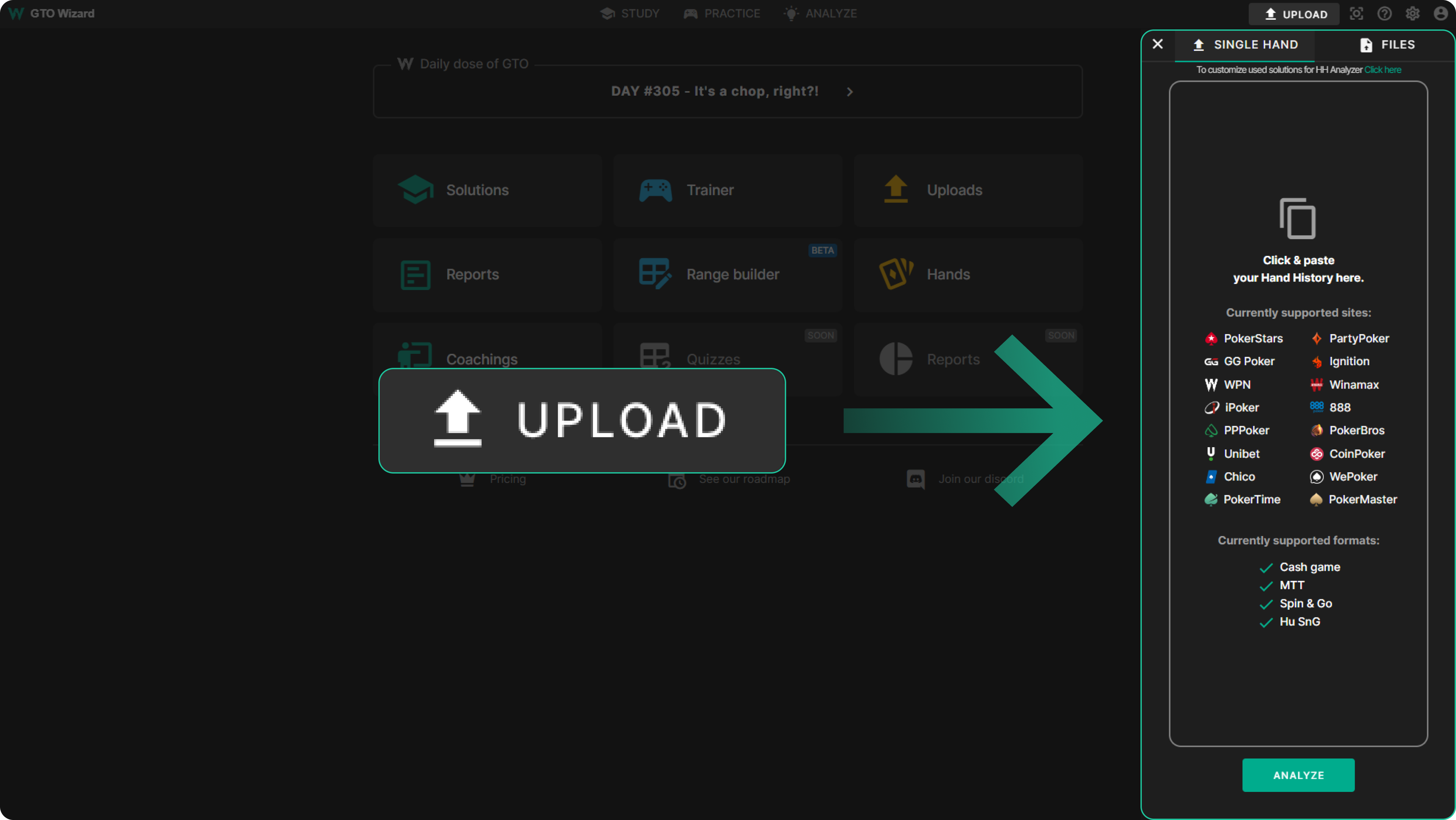
{{toggle: How to Export From HUD}}
{{/toggle}}
{{toggle: How to Export From Poker Room}}
{{grid: 2}}
{{/grid}}
{{/toggle}}
How Do I Export Hand Histories From a HUD?
{{grid: 1fr 18fr}}

Poker Tracker 4
{{/grid}}
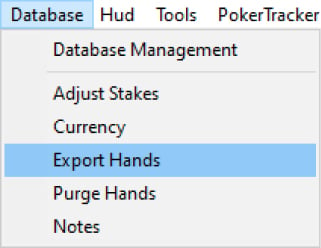
To export hands from PT4, select Database -> Export hands
{{width: 40%}}
{{/width}}
Select the session you want to export, select “Export hands“, save the file (as .txt), then simply upload that file to GTO Wizard. Watch the video tutorial HERE or read this GUIDE.
{{grid: 1fr 12fr}}

Holdem Manager 3
{{/grid}}
Open the Database Manager and select “Export“. Watch this video for details.
Select the session you want to export, select “Export hands“, save the file (as .txt), then simply upload that file to GTO Wizard. You can check the tutorial HERE.
{{grid: 1fr 12fr}}

Hand 2 Note
{{/grid}}
- Go to the Reports section
- Set the nickname of the player or alias, select the desired date range. If you wish, you can also specify other filters
- Right-click on the results and select “Export all hands“
- In the window that appears, specify the export path and click “Select Folder“. The export process will begin
- Then, simply upload that file to GTO Wizard!
{{grid: 1fr 11fr}}

Poker Copilot
{{/grid}}
- You can export data by choosing File -> Export… from the menu
- When you click on the “Export…” button, you will be prompted to choose a location and filename for your exported data
- Select “Export as hand history files“, the export will create text files that can be saved to your hard drive
Exporting Data | Poker Copilot
{{grid: 1fr 12fr}}

DriveHUD
{{/grid}}
CTRL + Click to select multiple hands at once or press CTRL + A to select all the hands. Then right-click on the hands and press on “Export Hands” -> “3rd party apps“.
This exports your hands in a format compatible with GTO Wizard.
CTRL + click on the hands you want for multiple hands at once.
Or you can right-click on a session in sessions report and “Export to 3rd party app” to get all hands. You can do this for any report really including overall (to get all of your hands exported).
This exports your hands in iPoker text format, which can be read from GTO Wizard.
How Do I Export Hand Histories From a Poker Room?
{{grid: 1fr 12fr}}

PokerStars
{{/grid}}
- From the PokerStars lobby, click on Options -> Instant Hand history Options
- Check Save My Hands History
- Please note the default location where PokerStars is saving your hand histories under Where To Save
- Click OK to save the settings
Hand histories: Where to find them and what to do with them | Pokerstars
Pokerstars configuration guide | PokerTracker
Pokerstars configuration guide | Holdem Manager 3
{{grid: 1fr 12fr}}

GG Poker
{{/grid}}
- Select Pokercraft in the bottom right corner
- Select the type of game whose hands you’re trying to export
- Select the HH date ranges
- Select ALL and click on “Download“
- Upload the file to GTO Wizard
Downloading Hand Histories | GG Poker
How to import your hand history from GGPoker to PT4 or HM3 | StandardBacking
{{grid: 1fr 12fr}}

WPN (America’s Card Room)
{{/grid}}
Hand histories from AmericasCardRoom (ACR) client are saved by default in the following directory: “C:\AmericasCardroom\handHistory”
To check it, do the following:
- Open AmericasCardRoom client
- Click on “Game Info” at the top menu
- Click on “View Hand History“
- Click the “Options” button at the bottom of the appeared window
- Check the “Save Hand History” checkbox and “Destination folder” values
How to Save Hand Histories from AmericasCardRoom Client | ICM Poker
Configuration guide | PokerTracker
{{grid: 1fr 12fr}}

iPoker
{{/grid}}
You must configure the iPoker client to save hand histories to a designated directory on your hard drive. This step is required to allow PokerTracker 4 to import the hand histories for the database and display the HUD.
To save your Hand Histories on iPoker, do the following:
- From the iPoker lobby, click on My Account -> Settings and go to the General section
- Check Store Hand History Locally
- Please note the default location where iPoker is saving your hand histories
- The default location is %appdata%\Local\<iPoker Client>\data\<Screenname>\History\Data
- With <iPoker Client> being the name of the iPoker client you have installed and <Screenname> being your screenname in the iPoker client
Configuration guide | PokerTracker
Configuration guide | Holdem Manager 3
{{grid: 1fr 12fr}}

PPPoker
{{/grid}}
Converters are required for poker sites that do not write complete hand histories to your disk. This is paid software. A converter will automatically write hand histories to your hard drive, which can then be exported to GTO Wizard or hand trackers.
Where can I check my hand history? | PPPoker
Hand converters for PPPoker can be found HERE.
{{grid: 1fr 12fr}}

Unibet
{{/grid}}
- Choose your game format and click on the History sub-tab
- Find the hand histories you want to export
- Click on the copy icon (circled in screenshot). Your hand history is copied to the clipboard.
- Either paste directly into GTO Wizard or save it in a text file then upload.
{{exclamation-mark}}
For the Analyzer to work, all Villain hole cards need to be manually removed from the preflop section of the HH before upload.
{{/exclamation-mark}}

{{grid: 1fr 12fr}}

PartyPoker
{{/grid}}
- Click on the drop down arrow next to the avatar and then on “My Game“
- Click on “Export Hands“
- Select the time period that the hands were played
How can I download my hand history in the poker software? | PartyPoker
PartyGaming Configuration Guide | PokerTracker
{{grid: 1fr 10fr}}

Ignition
{{/grid}}
To download your hand history through the Ignition Poker software, click on Account, then Hand History, then Game Transactions. Select which type of poker game you want the hands from: Zone Poker, Ring Games, Sit and Go Tournaments, or Scheduled Tournaments.
Configuration Guide | Holdem Manager 3
Converters are required for poker sites that do not write complete hand histories to your disk. This is paid software. A converter will automatically write hand histories to your hard drive, which can then be exported to GTO Wizard or hand trackers.
Hand converters for Ignition can be found here:
Ignition Hand Grabber | PokerTracker
Asian poker rooms – Hand converter | PokerTracker
{{grid: 1fr 12fr}}

Winamax
{{/grid}}
By default, Winamax automatically stores hand history files in the “Winamax folder“, located in “My Documents“. If this folder does not already exist, it will be created after the first hand is played. Winamax does not provide a method of changing the location of the hand history folder.
On Windows:
On Mac:
Configuration guide | PokerTracker
Configuration guide | Holdem Manager 3
{{grid: 1fr 9fr}}

888
{{/grid}}
Go to the User Settings screen and choose the Game settings tab, and the Hand History option. To save all of your hand history, check the Save My Hand History box. Once this option is enabled, every hand you play will be saved in the destination folder.
Learn about our Game Features at 888poker
888 Poker Configuration Guide | PokerTracker
Configuration Guide | Holdem Manager 3
{{grid: 1fr 12fr}}

PokerBros
{{/grid}}
Converters are required for poker sites that do not write complete hand histories to your disk. This is paid software. A converter will automatically write hand histories to your hard drive, which can then be exported to GTO Wizard or hand trackers.
Hand converters for PokerBros can be found HERE.
{{grid: 1fr 12fr}}

Chico
{{/grid}}
Converters are required for poker sites that do not write complete hand histories to your disk. This is paid software. A converter will automatically write hand histories to your hard drive, which can then be exported to GTO Wizard or hand trackers.
Chico Poker Network hand history converter | KingsHands
{{grid: 1fr 17fr}}

CoinPoker
{{/grid}}
Converters are required for poker sites that do not write complete hand histories to your disk. This is paid software. A converter will automatically write hand histories to your hard drive, which can then be exported to GTO Wizard or hand trackers.
{{grid: 1fr 17fr}}

WePoker
{{/grid}}
Converters are required for poker sites that do not write complete hand histories to your disk. This is paid software. A converter will automatically write hand histories to your hard drive, which can then be exported to GTO Wizard or hand trackers.
Hand converters for PokerBros can be found HERE.
{{grid: 1fr 19fr}}

UPoker
{{/grid}}
Converters are required for poker sites that do not write complete hand histories to your disk. This is paid software. A converter will automatically write hand histories to your hard drive, which can then be exported to GTO Wizard or hand trackers.
Hand converters for PokerBros can be found HERE.
Didn’t Find What You Need?
We support all major poker sites. If you don’t see your site here, let us know on our Discord server.
If you can’t figure out how to get your hands, then we recommend contacting the poker site support team via email. Most poker rooms have a dedicated support team that will help you find answers, or even email you your hand histories. Please let us know through Discord if this guide needs to be
How to Upload Your Hand Histories

How to Study Analyzed Hands
So now that you know the mechanics of the Hand History Analyzer, how do you go about studying? This article will teach you a few tips and tricks to get the most out of the Analyzer.
Analyzed Hands
GTO Wizard makes it easy to review your play with our Hand History Analyzer. Analyzed Hands.